If you have ever looked at a battery monitor and wondered whether the numbers were good, bad, or about to ruin your trip, you are not alone. A LiFePO4 battery monitor can show state of charge, amp draw, voltage, amp-hours used, and estimated time remaining. The hard part is knowing what those numbers actually mean when you are on the water, at camp, or running radio gear away from home.
That matters because LiFePO4 batteries behave differently than old lead-acid batteries. They hold voltage more consistently through much of their discharge curve, which is one reason people like them for fish finders, trolling motors, camp fridges, solar setups, and ham radio. But that same steady voltage can make a simple voltage reading less useful as a fuel gauge.
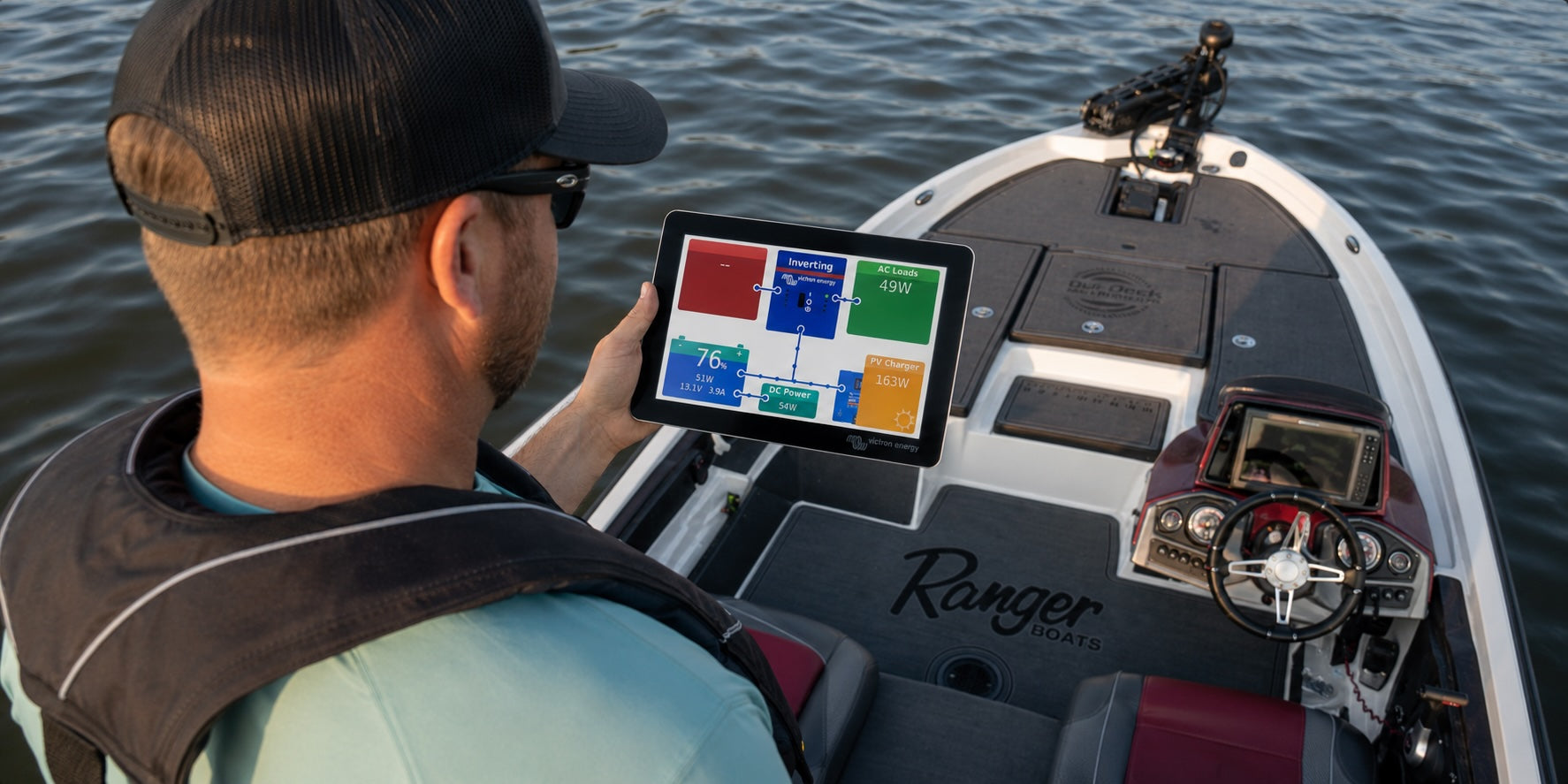
The better approach is to read your battery monitor as a live power dashboard, not just a percentage display. When you understand what the monitor is showing, you can make smarter decisions about what to run, when to recharge, and how much reserve to keep.
Why a LiFePO4 Battery Monitor Matters in the Field
Voltage alone can mislead you
With many lead-acid batteries, voltage drop gives users a rough sense of battery condition. It is not perfect, but people often use it as a quick reference. LiFePO4 batteries are different. They tend to maintain a flatter voltage curve for much of their usable capacity, then drop more quickly near the end.
That means a LiFePO4 battery can look stable for a long time, even while capacity is being used. If you only check voltage, you may feel confident until the battery is closer to empty than expected. A monitor gives you a better view because it tracks more than voltage.
For customers using Bioenno Power batteries across fishing, RV, solar, and portable power applications, this is especially important. The same battery chemistry that gives you consistent output also rewards better monitoring habits.
Monitoring turns guesswork into decisions
A battery monitor helps answer practical field questions:
- How much battery do I have left
- How fast am I using power right now
- How much power is coming back in from solar or charging
- How long can I keep this setup running
- Do I need to reduce loads before the end of the day
Those questions matter more than a generic “battery full” or “battery low” reading. If your fish finder is drawing steady power, your camp fridge is cycling, or your radio is moving between receive and transmit, your usage changes throughout the day. A monitor helps you respond to those changes.
Who benefits most from better battery data
Battery monitoring is useful for almost anyone using LiFePO4 batteries, but it becomes especially valuable when your setup has more than one load or runs for several hours away from a wall outlet.
Marine users can watch electronics, livewells, and trolling motor support loads. RV and overlanding users can track fridges, lights, fans, device charging, and inverter use. Ham radio operators can see the difference between receive draw and transmit draw during real operation.
If you are still choosing a battery, it helps to start with a LiFePO4 model that fits your application and then think about how you will track usage in the field. Compare voltage and capacity first, then decide whether your setup also needs monitoring.

What Your LiFePO4 Battery Monitor Is Telling You
State of charge
State of charge is the battery’s estimated remaining capacity, usually shown as a percentage. This is the number most people look at first. It is useful, but it should not be treated as perfect truth in every situation.
A battery monitor estimates state of charge based on measured current, voltage, and configured battery settings. Battery University explains that voltage-based state-of-charge readings can be inaccurate during active use, especially with lithium iron phosphate batteries, while coulomb counting estimates state of charge by measuring current flowing in and out of the battery.
The key word is calculates. A monitor is only as useful as its setup and the quality of the data it is receiving. If battery capacity is configured incorrectly, if the monitor has not synchronized properly, or if some loads bypass the shunt, the percentage can drift.
Current draw and charge input
Current is usually shown in amps. If the number is negative, the battery is typically discharging. If the number is positive, the battery is typically charging. Display conventions can vary, so always confirm how your specific monitor reports direction.
Current tells you what is happening right now. A camp fridge might draw more when the compressor is running and much less when it cycles off. A ham radio might draw modest current while receiving and much higher current while transmitting. A boat setup might show a low draw from electronics, then spike when other equipment turns on.
This live amp reading is one of the most useful parts of the monitor because it connects your behavior to battery usage. Turn something on, watch the draw change, and you quickly learn which devices matter most.
Amp-hours and time remaining
Amp-hours show how much capacity has been used or how much capacity remains, depending on the monitor. Time remaining tries to estimate how long the battery can keep supporting the current draw.
Time remaining is helpful, but it changes constantly. If your current draw doubles, the estimated runtime drops. If solar input comes in, the estimate improves. If your fridge cycles off, runtime may look better. That does not mean the monitor is broken. It means your system is changing.
Think of time remaining as a moving estimate, not a promise. It is most accurate when your loads are steady.
How to Estimate Lithium Battery Runtime From Live Draw
Start with the load you are running now
A simple runtime estimate starts with battery capacity and current draw. If you have a 100Ah battery and your setup is drawing 5 amps, the simple math suggests about 20 hours of runtime before reserve and real-world factors.
That estimate is not meant to replace product guidance or safe operating limits, but it helps you understand the relationship between load and runtime. The formula is simple: battery capacity in amp-hours divided by current draw in amps equals estimated hours.
Use that number as a planning estimate, not a guarantee, because real-world runtime can change with cycling loads, temperature, inverter losses, wiring, and how much reserve you want to keep.
For example, a 100Ah battery supporting a 5 amp load gives a rough estimate of 20 hours. A 10 amp load gives a rough estimate of 10 hours. A 2 amp load gives a rough estimate of 50 hours.
Watch how draw changes during real use
Most field setups do not draw the same current all day. That is why live monitoring is more useful than a one-time calculation.
Here are practical examples:
- Fish finder and livewell use: A fish finder may be fairly steady, while a livewell or other accessory may cycle. Watch the monitor as each device turns on so you know what changes the draw.
- Camp fridge use: A fridge may pull more power when cooling, then less when resting. The average over time matters more than one momentary reading.
- Ham radio operation: Receiving and transmitting can have very different power demands. Operators should check draw during actual transmit use, not just standby.
- Real-time load changes: If your monitor shows a 4 amp draw with electronics running and jumps to 8 amps when another device turns on, you have just cut the rough runtime estimate in half unless charging input also increases.
This is where a battery monitor becomes an educational tool. It shows you which loads are small, which are significant, and which ones deserve more planning.
Use solar input as part of the picture
Solar changes the math because it adds power back into the system during the day. If your panel and controller are producing input while your devices are drawing power, the battery monitor may show a lower net discharge or even a net charge.
That can extend usable runtime, but solar input is not always steady. Shade, clouds, panel angle, temperature, and time of day all affect output. A monitor helps you see what is really happening instead of assuming the panel is keeping up.
For users building solar-supported battery systems, Bioenno Power’s solar and outdoor collection can help pair portable charging with field power needs.
Field Examples for Boats, RVs, and Ham Radio
Boat electronics and fishing days
On a fishing day, battery anxiety often starts when you are far from the dock and still have hours left on the water. A monitor helps by showing whether your electronics are drawing what you expected.
For example, if your fish finder and accessories are pulling a few amps, you can compare that draw to the capacity you brought. If the number suddenly jumps, you know something changed. Maybe another accessory turned on. Maybe a pump started running. Maybe the setup is not wired the way you thought.
Marine users can use this information to protect the day. Instead of waiting for a low battery surprise, you can adjust brightness, reduce unnecessary loads, or decide when to head back with a safe reserve. If your setup includes fish finders, onboard electronics, or trolling motor support loads, Bioenno Power’s marine battery collection can help match battery capacity to boating use.
Camp fridges and RV house loads
RV and overlanding setups are often harder to judge because loads come and go. A fridge cycles. Phones charge and stop charging. A fan runs overnight. Lights may be on for several hours. An inverter can add a large draw depending on what it powers.
A monitor helps you understand your overnight pattern. If your battery drops from 100 percent to 72 percent by morning, you have a real data point. If solar brings it back to 95 percent by afternoon, that is also useful. After a few trips, you can see whether your system is oversized, undersized, or just right for how you travel.
That kind of learning is more helpful than a generic battery chart. If you are matching a battery to RV or overlanding loads, Bioenno Power’s RV battery collection is a useful starting point for mobile power planning.
Ham radio transmit and receive cycles
Ham radio is a perfect example of why live draw matters. A station may use modest power while receiving, then draw much more during transmit. If you size a battery based only on receive current, runtime estimates can be too optimistic.
During portable operation, Field Day, or emergency communication work, check the monitor during both receive and transmit. You may find that duty cycle matters more than the headline wattage. A station that transmits briefly and listens often will behave differently than one transmitting frequently.
For radio operators, the monitor becomes part of operating discipline. It helps you decide when to reduce output power, when to recharge, and how much reserve to keep for the end of the event.

Common LiFePO4 Battery Monitor Mistakes to Avoid
Treating percentage as perfect truth
The percentage is useful, but it is not magic. If the monitor is set up incorrectly, state of charge may be wrong. If the battery capacity setting does not match the actual battery bank, the estimate can drift. If loads are connected in a way that bypasses the monitor, the shunt may not see the full picture.
Use percentage as one input, not the only input. Compare it with live current, amp-hours used, and what you know about the day’s usage.
Forgetting to check what is charging
Many users focus on what is leaving the battery but forget to watch what is coming back in. If you have solar, shore charging, or another charging source, the monitor can show whether the system is actually replacing energy.
This is especially useful for troubleshooting. If a solar panel is connected but the monitor shows no charge input, you know to check panel position, wiring, controller behavior, or sunlight conditions.
Ignoring setup and calibration
A battery monitor needs correct settings to be useful. Battery capacity, charged voltage, tail current, and synchronization settings can all affect accuracy, depending on the monitor.
If installation requires wiring changes, follow the monitor manufacturer’s instructions and have a qualified installer review the setup when you are unsure.
Avoid these common setup issues:
- Entering the wrong battery capacity
- Adding loads that do not pass through the shunt
- Assuming time remaining is accurate under changing loads
- Forgetting that solar input changes throughout the day
- Never checking whether the monitor has synchronized after a full charge
If you are not sure which cables, adapters, wattmeters, or related accessories fit your battery system, review Bioenno Power’s accessories collection and confirm fitment before installing components.
When to Add a Shunt or Battery Monitor
Single battery use
If you are using one small battery for a simple device, a monitor may not be necessary. For example, a compact battery used for one predictable load may be easy to manage with experience and occasional checks.
But even simple setups can benefit from monitoring if the battery is used in different conditions, shared across devices, or relied on for safety and communication.
Multi-load and multi-day systems
A battery monitor becomes much more valuable when you have multiple loads or multi-day use. Boats with several electronics, RVs with house loads, solar-supported camps, and ham radio field stations all benefit from better visibility.
The more your draw changes, the more a monitor helps. It shows what is happening instead of forcing you to guess.
Choosing the right next step
If you already own a Bioenno Power LiFePO4 battery, the next step is to look at how you use it. If your setup is simple and predictable, you may only need basic battery management habits. If your setup supports expensive electronics, multi-day travel, emergency communication, or solar input, a shunt-style monitor may be worth adding.
The goal is not to stare at numbers all day. The goal is to make better field decisions with confidence. A good monitor helps you understand your system, protect your reserve, and get more value from your LiFePO4 battery.
When you are ready to build or improve your setup, choose a Bioenno Power battery and accessory combination that matches your actual power use, not just the biggest number on the shelf. Shop Bioenno Power’s full battery collection to build a field-ready system with the visibility you need. If you’re not sure what will work best for your needs, get in touch with us and we’ll help you find the best solution.